Showing posts with label SD-WAN. Show all posts

Sunday, 27 April 2025

SDWAN - Port Hopping and Port-Offset with example

Port Hopping: 

WAN Edge devices manage control plane connectivity using port hopping.

To summarize and clarify:

  • Default base port: 12346

  • Port hopping pattern: Increments by 20, trying 12366, 12386, 12406, 12426, then loops back.

  • Enabled by default on WAN Edge routers, but can be disabled globally or per interface

  • Recommended practice:

    • Enable on branches for better connection reliability

    • Disable on data centers, hubs, or high-traffic locations to avoid connection disruption

  • Disabled by default on controllers (vManage, vSmart) and should remain disabled

  • vManage/vSmart with multi-core setup: Use different base ports per core


Port Offset:

Why Use Port Offsets Behind NAT?

When multiple WAN Edge routers sit behind the same NAT device and share a public IP address, if they all use the same base port (12346) to initiate connections to the controllers, the NAT device may not handle translation cleanly, causing connection failures or instability.

Solution: Port Offset

  • Base Port: 12346

  • With Port Offset = 1:

    • Base port becomes 12347

    • Port hopping pattern becomes: 12367, 12387, 12407, 12427

vBond IPs and port are static, It is recommended to permit UDP destination port 12346 to vBond and permit UDP source port 12346 from vBond.

This offset ensures each WAN Edge behind the same NAT has a unique source port pattern, minimizing NAT conflicts and making port usage predictable.

Default Behavior

  • Port Offset = 0 by default (i.e., no change from 12346)

  • You must explicitly configure an offset per WAN Edge router

Now Lets Play with Port-offset 

from vEDGE to Other vEDGE and Controllers BFD session and Control Connections  with destination UDP port 12346


Lets change the Port-offset = 2 on vEDGE 


all BFD and IPsec tunnel are reset 


Saturday, 13 January 2024

SDWAN tloc-list verses local-tloc-list

CASE STUDY - LOCAL-TLOC-LIST ver TLOC-LIST

LOCAL-TLOC-LIST 

Syntax : set local-tloc color {color} [encap {ipsec|gre}] 

where color is any one of the supported TLOC colors. This action directs packets to be forwarded out of the TLOC that is specified in the color argument. If this TLOC is not available (because it is not configured, the tunnel is down, or so on), then the traffic is forwarded out any valid TLOC, as indicated by the routing table. There is also a configuration command called set local-tloc-list that allows for the selection of one or more colors.


local-tloc action selects the preferred egress TLOC on the local WAN Edge router, while the
TLOC-List action mandates the TLOCs on the receiving WAN Edge that the traffic will be forwarded to

CONFIGURATION DIFFERENCE 

Seqence 11 for youtube traffic follow the traffic path biz-internet and when biz-internet down it take path from avalible color - mpls 

sequence 11
  match
    app-list YouTube
     source-ip 0.0.0.0/0
!
 action accept
set
 local-tloc-list
  color biz-internet
  encap ipsec

Sequence 21 is for fackbook traffic during biz-internet UP will follow biz-internet path but when biz-internet down then fackbook traffic drop

sequence 21
    match
      app-list Facebook
      source-ip 0.0.0.0/0
!
    action accept
    set
       vpn 1
       tloc-list DC_INET_TLOCS


Let see when applying above command during avalibilty of  Color biz-internt and when BFD down for biz-internet so traffic for youtube and fackbook follow different way based on given command - local-tloc-list ver tloc-list 

FLOW EXAMPLE

When BFD related with Color- biz-internet - UP 

local-tloc-list 
Branch-vEdge-1# show policy service-path vpn 1 interface ge0/3 source-ip 10.1.102.1 dest-ip 0.0.0.0 protocol 1 app youtube all
!
Number of possible next hops: 1
Next Hop: IPsec
Source: 100.64.102.2 12346 Destination: 100.64.21.2 12386 Color:biz-internet 

tloc-list
Branch-vEdge-1# show policy service-path vpn 1 interface ge0/3 source-ip 10.1.102.1 dest-ip 0.0.0.0 protocol 1 app facebook all
!
Number of possible next hops: 1
Next Hop: IPsec
Source: 100.64.102.2 12346 Destination: 100.64.21.2 12386 Color:biz-internet 

When BFD related with Color- biz-internet - DOWN 

local-tloc-list
BR2-vEdge-1# show policy service-path vpn 1 interface ge0/3 source-ip 10.1.102.1 dest-ip 0.0.0.0 protocol 1 app youtube all
dest-ip 0.0.0.0 protocol 1 app youtube all
Number of possible next hops: 1
Next Hop: IPsec
Source: 172.16.102.2 12346 Destination: 172.16.21.2 Color: mpls

tloc-list
BR2-vEdge-1# show policy service-path vpn 1 interface ge0/3 source-ip 10.1.102.1 dest-ip 0.0.0.0 protocol 1 app facebook all
dest-ip 0.0.0.0 protocol 1 app facebook all
Number of possible next hops: 1
Next Hop: Blackhole  <<<<<<<<<Traffic drop

Saturday, 5 August 2023

SDWAN - DEFAULT ROUTE ADVERTISE HUB to REMOTE SITE

CONDITION 

We need to advertise default route from HUB as we have Firewall/Internet , So any Unknown Traffic should go to HUB first.

Backhauling moves the traffic to a datacenter where firewalls are deployed and a secure Internet access is available

Lets start 


From SITE - 100 HUB site , We adevertise the Default route in OMP 


Check BGP advertise Default from SITE 100 Router 


Now Check On vEDGE SITE 100 and see the Default route in Adevrtise from vEDGE 

OMP Routes 


Now check on SITE 300 , We have seen the Default route and notice this deafult route advertise by vSMART 


vSMART - System IP - 1.1.1.30


Now Open Route and see the Originator for default route.


Thanks will continue with Next blogs


SDWAN - BGP SERVICE VPN CONFIGURATION - USING TEMPLATE

 CONDITION 

Configure Service VPN with BGP for Remote Site communication 

Configuration Parameter

1. SDWAN Control plan and Data plan already preconfigured for connectivity

2. BGP between vEDGE and Router 

3. BGP AS Number 10 

4.Loopback1 Advertise in BGP 

5.Create BGP Template in Service VPN 

TOPOLOGY LAB


LETS START LAB - 

STEP 1 - To Create Feature Template BGP in SERVICE VPN 


The Below paramater select based on requirement 

BGP -
 Shutdown - No (Enabled BGP)
 AS Number - Device specific - It ask during Template push to Device 
 Router ID - Device specific 
 Other Parameter make Default 


Provide Redistribution OMP in BGP to get the Routes from OMP to BGP 


Now Lets configure BGP Neigbour - Put all Device Specific - will fill during apply on Device.


Now Feature BGP Template ready to call in Template , I have already below Template apply on Device 


Now Got to section Service VPN and Call BGP Feature Template here


And also got to feature template VPN 1 and enable BGP to OMP redistribution 


Now attached the template on device 


Attached Template with Device Specific Values 


Now Validate the Configuration 

First to Validate the Template enable on Device 


BGP Neigbour Status on VEDGE 


Router BGP status and Prefix learning 


Remote Site - 300 Subnet Recevied on SITE - 100


VEDGE 04 SITE 300 


SITE - 100 To SITE - 300 Communication check 


Will Continue with maniputaion in Next Blogs :)

Tuesday, 25 July 2023

SDWAN- Route Leaking Between VPNs - SDWAN

 Condition :

Customer having different VPNs for different Service and they want VPN 2 to Communicate with VPN 1 

Use of Export Command 

Topology :

SITE ID 300 


SITE ID  100


SITE ID 300 vEDGE-4 Configured with Service VPN 2 


SITE ID 100 vEDGE-01 with Service VPN 1 


Now lets Start the Process and configuration for VPN 1 and VPN 2 communication 

vSMART - With Central Policy configuration for VPN 1 route to export in VPN 2 and vice versa VPN 2 Route to export in VPN1 

vSmart# show running-config policy

policy

 data-policy test-cflowd-policy

  vpn-list vpn_1

   sequence 1

    match

     protocol 1

    action accept

     cflowd

   default-action accept

 cflowd-template test-cflowd-template

  template-refresh 90

  collector vpn 1 address 1.1.1.20 port 13322 transport transport_tcp

 lists

  vpn-list vpn_1

   vpn 1

  vpn-list vpn_2

   vpn 2                                                                                                                                                                                                                                                                                                                   site-list cflowd-sites

   site-id 100

   site-id 200

   site-id 300

 control-policy SHARED-SERVICES-TO-SPOKES

  sequence 1

   match route

    vpn-list vpn_2

   action accept

    export-to

     vpn 1

  sequence 2

   match route

    vpn-list vpn_1

   action accept

    export-to                                                                                                                                                                                                           vpn 2

  default-action accept


Now Validate the Routes from VPN 1 and VPN 2 on vEDGES for SITEs  

vEDGE-01  SITE ID 100 - OMP Routes , we can see the VPN 2 routes showing in VPN 1 


SITE ID 100 - vEDGE-01 - VPN 1 Subnet 10.160.10.2/24 

SITE ID 300 - vEDGE-04 - VPN 2 Subnet 10.4.251.2/24          


Below we have seen all routes recevied from vSmart on vEdge-01 via OMP in VPN 1

vEDGE01 -


Below we have seen all routes recevied from vSmart on vEdge-04 via OMP in VPN 2

vEDGE04- 


Now lets check if we can reach from vEDGE-01 VPN 1 to vEDGE-04 VPN 2 Subnets


SDWAN - rx-ip-ttl-expired - WHY these DROPS in vEDGE

Condition:

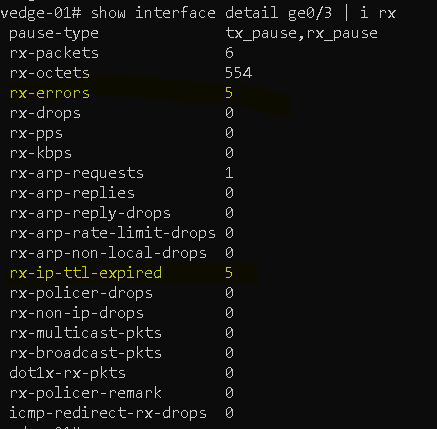
We have seen on vEDGE on counter which is increase , Counter name "rx-ip-ttl-expired "

Lets understand these Errors 

When we run the command on vEDGE "show interface detail ge0/3" we will see the rx-errors and when we check more deep we found that these rx-error due to rx-ip-ttl-expired.

 rx-ip-ttl-expired—Received IP packets whose time-to-live value expired.

TTL Expired in Transit tells the Time To Live value set for the ping packets is too low while traveling through the network before reaching the destination.

LAB results for explation 

vEDGE 

Lets clear the counters on vEDGE 

LAN SIDE PORT ge0/3 which we have seen these errors


Lets now generate the ICMP packet with IP TTL =1 so that this will reported TTL Expired on vEDGE 


START Ping from LAN side PC 


Now lets check on vEDGE for These Packet produce the rx-error

rx-error = 5 packets and same rx-ip-ttl-expired = 5 packets , means the packets which are vEdge mark TTL expired they are showing as rx-error as well.


This value can increase if you have not stop the devices which is sending TTL value 1 packets 


Saturday, 8 July 2023

SDWAN - Service side redundancy using VRRP

Service Side redundancy using VRRP


Virtual Router Redundancy Protocol(VRRP)

redundancy options for the service side VPNs is to provide a resilient default gateway to hosts in a segment using the Virtual Router Redundancy Protocol(VRRP).However, we have to make one important design consideration when designing service-side redundancy using VRRP in Cisco SD-WAN. Because vEdges never exchange control-plane information directly among themselves, when the master router loses connection to the overlay fabric, the hosts in the segment lose connection to the network domain.


The below LAB SITE ID 100 


The VRRP SETUP for VPN 1 

For vEDGE 1  SITE ID 100

vpn 1
 name Corporate-VPN
 interface ge0/3
  ip address 10.160.10.2/24
  no shutdown
  vrrp 100
   priority 200
   ipv4 10.160.10.1

For vEDGE 2 SITE ID 100

vpn 1
 name Corporate-VPN
 interface ge0/3
  ip address 10.160.10.3/24
  no shutdown
  vrrp 100
   ipv4 10.160.10.1

When no priority on vrrp means default priority 100 

Now higher Priority WIN for  VRRP MASTER and Other become BACKUP , in that case vEDGE 1 become VRRP Master for VPN 1 Service VPN and vEDGE 2 Become BACKUP 

vedge-01# show vrrp
vrrp vpn 1
 interfaces ge0/3
  groups 100
   virtual-ip             10.160.10.1
   virtual-mac            00:00:5e:00:01:64
   priority               200
   vrrp-state             master
   omp-state              up
   advertisement-timer    1
   master-down-timer      3
   last-state-change-time 2023-07-08T04:22:12+00:00


vEdge-02# show vrrp
vrrp vpn 1
 interfaces ge0/3
  groups 100
   virtual-ip             10.160.10.1
   virtual-mac            00:00:5e:00:01:64
   priority               100
   vrrp-state             backup
   omp-state              up
   advertisement-timer    1
   master-down-timer      3
   last-state-change-time 2023-07-08T07:09:17+00:00


NEXT Blog will discuss on Trackers 

Friday, 7 July 2023

SDWAN - Cflowd IMPLEMENTATION AND VALIDATION

 SDWAN - Cflowd IMPLEMENTATION AND VALIDATION

This is very important feature which help us to identify the traffic and how they route from vEDGE , Today I will be going to configure the Cflowd Policy with CLI Template and how we can check the traffic.

flowd traffic flow monitoring can be configured. By using Cflowd template option, including location of Cflowd collector and actions in data policy Cflowd monitoring can be enabled.


Cflowd Routing Policy CLI Template Values


For creating any policy in SDWAN we need to first create the LISTS

-       >  LISTS 

-        > POLICY

-        > APPLY POLICY


LISTS CREATION

I have 3 Site – IDs , I configure separated may in your new code it will come like “Site-id 100,200,300” accepted

!

 lists

  vpn-list vpn_1

   vpn 1

  !

  site-list cflowd-sites

   site-id 100

   site-id 200

   site-id 300

  !


POLICY CREATION

-        Created Data policy for Cflowd

-        Match traffic based on Protocol you can use any match condition

-        For collector create cflowd Template – transport type can be UDP or TCP

policy

 data-policy test-cflowd-policy

  vpn-list vpn_1

   sequence 1

    match

     protocol 6

     protocol 17

     protocol 1

    !

    action accept

     cflowd

    !

   !

   default-action accept

  !

 !

 cflowd-template test-cflowd-template

  flow-inactive-timeout 60

  template-refresh      90

  collector vpn 1 address 1.1.1.20 port 13322 transport transport_tcp


APPLY POLICY

Last step to apply this policy on SITE-LIST which we created

apply-policy

 site-list cflowd-sites

  data-policy     test-cflowd-policy

  cflowd-template test-cflowd-template


NOW Making CLI TEMPATE FOR POLICY


Now we need to ACTIVATE this policy


It will ask confirmation for activate this Policy on vSmarts , In my Lab we have 1 vSMART


We can see the Policy applied successfully


VALIDATION PART

Now we need to validate the policy applied and working or not.

vSmart# show running-config apply-policy

apply-policy

 site-list cflowd-sites

  data-policy test-cflowd-policy all

  cflowd-template test-cflowd-template


This will show the policy is applied on vSMART now we will check as this is DATA policy then we can see this on vEDGE itself.

vedge-01# show policy from-vsmart

from-vsmart data-policy test-cflowd-policy

 direction all

 vpn-list vpn_1

  sequence 1

   match

    protocol 1

   action accept

    cflowd

  default-action accept

from-vsmart cflowd-template test-cflowd-template

 flow-active-timeout    600

 flow-inactive-timeout  60

 template-refresh       90

 flow-sampling-interval 1

 collector vpn 1 address 1.1.1.20 port 13322 transport transport_tcp

from-vsmart lists vpn-list vpn_1

 vpn 1

vedge-01#


Now we validate the Cflowd results for traffic


vedge-01# show app cflowd flows | tab


                                                          TCP                                                                            TIME    EGRESS  INGRESS

                                 SRC   DEST        IP     CNTRL  ICMP                  TOTAL  TOTAL  MIN  MAX                            TO      INTF    INTF     APP

VPN  SRC IP        DEST IP       PORT  PORT  DSCP  PROTO  BITS   OPCODE  NHOP IP       PKTS   BYTES  LEN  LEN  START TIME                EXPIRE  NAME    NAME     ID

-----------------------------------------------------------------------------------------------------------------------------------------------------------------------

1    10.4.251.1    10.160.10.10  0     0     0     1      0      2048    10.160.10.10  2      168    84   84   Sat Jul  8 05:52:26 2023  59      ge0/3   ge0/0    0

1    10.160.10.10  10.4.251.1    0     0     0     1      0      0       10.1.1.60     2      196    98   98   Sat Jul  8 05:52:26 2023  59      ge0/0   ge0/3    0


You can see incoming and outgoing traffic in VPN 1 and during troubleshooting this will help to identify the traffic coming to vEDGE or not.