Showing posts with label C9800. Show all posts

Friday, 14 July 2023

WIRELESS - C9800 CLI Config Generator

 9800 CLI Config Generator

The Problem arrise when we have working with C9800 as the Configuration flow is totally different from normal AirOS Configuration and need more information to configure , Cisco has created some tools which help for Creating the configuration for C9800 and this help to smooth config.

There is Cisco 9800 CLI Config Generator Tool which help for creating CLI CONIG

https://community.cisco.com/t5/wireless-mobility-blogs/9800-cli-config-generator/ba-p/4129335


How to use it (Windows users):

Download the zip file onto your local machine

Unzip it and you should be able to see an executable file - “server.exe”

Run the executable

On your browser, type “localhost:7000” and you should be able to see a GUI open up.


The GUI has different options for configurations, you can select each of the tabs to configure specific features.


Select the TAB it open for file the config parameters and when yuo submit it convert the CLI Command 


You can directly copy this CLI command on C9800 device to configure via CLI , it easy :)

Thanks for checking Blog - I will posting more information 

Wednesday, 5 April 2023

PART 15 - IOS-XE and AirOS COMMAND MATCH - C9800


PART 14 - IOS-XE C9800 - WIRELESS CONTROLLER - COMPARE MODELS


PART 9 - C9800 - Troubleshooting - Embedded Packet Capture

 Embedded Packet Capture filtered on AP IP

ip access-list extended CAP-FILTER

permit ip host <AP_IP> any

permit ip any host <AP_IP>

monitor capture MYCAP clear

monitor capture MYCAP interface Po1 both

monitor capture MYCAP buffer size 100

monitor capture MYCAP match any

monitor capture MYCAP access-list CAP-FILTER

monitor capture MYCAP start

!!Reproduce

monitor capture MYCAP stop

monitor capture MYCAP export flash:|tftp:|http:.../filename.pcap

Packet Capture filtered on Client MAC(available after Cisco IOS® XE 17.1.1s)

monitor capture MYCAP clear

monitor capture MYCAP interface Po1 both

monitor capture MYCAP buffer size 100

monitor capture MYCAP match any

monitor capture MYCAP inner mac <Client_MAC>

monitor capture MYCAP start

!!Reproduce

monitor capture MYCAP stop

monitor capture MYCAP export flash:|tftp:|http:.../filename.pcap

Verify

show monitor capture MYCAP

show monitor capture MYCAP buffer brief/detail/dump


PART 8 - C9800 - Troubleshooting Commands - Always On : successful client connection : client connection failure : AP join failures

Always On: successful client connection

show log profile wireless filter mac 0040.96b9.b5c4 to-file output.txt

[client-orch-sm] [21109]: (note): MAC: f0c1.f10b.8ac1 Association received. BSSID 7069.5a51.4ec0, old BSSID 0000.0000.0000, WLAN RomanTest, Slot 0 AP 7069.5a51.4ec0, AP4C77.6D9E.6162

[client-orch-state] [21109]: (note): MAC: f0c1.f10b.8ac1 Client state transition: S_CO_INIT -> S_CO_ASSOCIATING

[dot11] [21109]: (note): MAC: f0c1.f10b.8ac1 Association success. AID 1, Roaming = False, WGB = False, 11r = False, 11w = False AID list: 0x1|0x0| 0x0| 0x0

[client-orch-state] [21109]: (note): MAC: f0c1.f10b.8ac1 Client state transition: S_CO_ASSOCIATING -> S_CO_L2_AUTH_IN_PROGRESS

[client-auth] [21109]: (note): MAC: f0c1.f10b.8ac1 ADD MOBILE sent. Client state flags: 0x71 BSSID: MAC: 7069.5a51.4ec0 capwap IFID:0x90000004

[client-auth] [21109]: (note): MAC: f0c1.f10b.8ac1 L2 Authentication initiated. method DOT1X, Policy VLAN 1477,AAA override = 0 , NAC = 0

[ewlc-infra-evq] [21109]: (note): Authentication Success. Resolved Policy bitmap:11 for client f0c1.f10b.8ac1

[client-auth] [21109]: (note): MAC: f0c1.f10b.8ac1 L2 Authentication Key Exchange Start. Resolved VLAN: 1477, Audit Session id:1E27300A0000000E127592C3

[client-keymgmt] [21109]: (note): MAC: f0c1.f10b.8ac1 EAP Key management successful. AKM:DOT1X Cipher:CCMP WPA2

[client-orch-sm] [21109]: (note): MAC: f0c1.f10b.8ac1 Mobility discovery triggered. Client mode: Local

[client-orch-state] [21109]: (note): MAC: f0c1.f10b.8ac1 Client state transition: S_CO_L2_AUTH_IN_PROGRESS ->S_CO_MOBILITY_DISCOVERY_IN_PROGRESS

[mm-client] [21109]: (note): MAC: f0c1.f10b.8ac1 Mobility Successful. Roam Type None, Sub Roam Type MM_SUB_ROAM_TYPE_NONE, Previous BSSID MAC:0000.0000.0000 Client IFID: 0xa0000001, Client Role: Local PoA: 0x90000004 PoP: 0x0

[client-auth] [21109]: (note): MAC: f0c1.f10b.8ac1 ADD MOBILE sent. Client state flags: 0x72 BSSID: MAC: 7069.5a51.4ec0 capwap IFID:0x90000004

[client-orch-state] [21109]: (note): MAC: f0c1.f10b.8ac1 Client state transition: S_CO_MOBILITY_DISCOVERY_IN_PROGRESS ->S_CO_DPATH_PLUMB_IN_PROGRESS

[dot11] [21109]: (note): MAC: f0c1.f10b.8ac1 Client datapath entry params - ssid:RomanTest,slot_id:0 bssid ifid: 0x0, radio_ifid: 0x90000003,wlan_ifid: 0xf0400002

[dpath_svc] [21109]: (note): MAC: f0c1.f10b.8ac1 Client datapath entry created for ifid 0xa0000001

[client-orch-state] [21109]: (note): MAC: f0c1.f10b.8ac1 Client state transition: S_CO_DPATH_PLUMB_IN_PROGRESS -> S_CO_IP_LEARN_IN_PROGRESS

[client-iplearn] [21109]: (note): MAC: f0c1.f10b.8ac1 Client IP learn successful. Method: DHCP IP: 192.168.77.200

[client-orch-state] [21109]: (note): MAC: f0c1.f10b.8ac1 Client state transition: S_CO_IP_LEARN_IN_PROGRESS -> S_CO_RUN


Always On: client connection failure

sh logging profile wireless filter mac f0c1.f10b.8ac to-file dot1x-failure.txt

2019/10/29 09:35:34.048 {wncd_x_R0-0}{1}: [client-orch-sm] [19470]: (note): MAC: f0c1.f10b.8ac1 Association received. BSSID 7069.5a51.4ec0, old BSSID7069.5a51.4ec0, WLAN RomanTest, Slot 0 AP 7069.5a51.4ec0, AP4C77.6D9E.6162

2019/10/29 09:35:34.048 {wncd_x_R0-0}{1}: [client-orch-state] [19470]: (note): MAC: f0c1.f10b.8ac1 Client state transition: S_CO_L2_AUTH_IN_PROGRESS-> S_CO_L2_AUTH_IN_PROGRESS

2019/10/29 09:35:34.048 {wncd_x_R0-0}{1}: [dot11] [19470]: (note): MAC: f0c1.f10b.8ac1 Association success. AID 1, Roaming = False, WGB = False, 11r= False, 11w = False AID list: 0x1| 0x0| 0x0| 0x0

2019/10/29 09:35:34.048 {wncd_x_R0-0}{1}: [client-orch-state] [19470]: (note): MAC: f0c1.f10b.8ac1 Client state transition: S_CO_L2_AUTH_IN_PROGRESS-> S_CO_L2_AUTH_IN_PROGRESS

2019/10/29 09:35:34.048 {wncd_x_R0-0}{1}: [client-auth] [19470]: (note): MAC: f0c1.f10b.8ac1 ADD MOBILE sent. Client state flags: 0x71 BSSID: MAC:7069.5a51.4ec0 capwap IFID: 0x90000004

2019/10/29 09:35:34.051 {wncd_x_R0-0}{1}: [client-auth] [19470]: (note): MAC: f0c1.f10b.8ac1 L2 Authentication initiated. method DOT1X, Policy VLAN1477,AAA override = 0 , NAC = 0

2019/10/29 09:35:34.330 {wncd_x_R0-0}{1}: [errmsg] [19470]: (note): %DOT1X-5-FAIL: Authentication failed for client (f0c1.f10b.8ac1) with reason (CredFail) on Interface capwap_90000004 AuditSessionID 000000000000000B16D9A13D Username: drghgdf


Always On : AP join failures

show log profile wir filter mac to-file output.txt

• Unsupported AP

[apmgr-capwap-join] [1263]: UUID: 0, ra: 0, TID: 0 (ERR): d824.bde8.3690 Join request not accepted: Unsupported AP Model AIR-LAP1142N-A-K9

• Reg Domain failure

[apmgr-capwap-config] [1394]: UUID: 10000000002ed, (ERR): f44e.0597.fb50 Failed to verify reg domain slot.validation of country code(UX) to regulatory domain(-A) error:1

[apmgr-capwap-config] [1394]: UUID: 10000000002ed, (ERR): f44e.0597.fb50 Failed to get ap default country code. Getdefault country code for AP error.

[apmgr-capwap-config] [1394]: UUID: 10000000002ed, (ERR): f44e.0597.fb50 Failed to set reg domain check status.country code US is not configured on WLC

• Cert Failure

[apmgr-capwap-config] [1394]: UUID: 10000000002ed, (ERR), %PKI-3-CERTIFICATE_INVALID_NOT_YET_VALID: Certificate chain validation has failed. The certificate (SN: 6B4F09560000001763DF) is not yet valid Validity period starts on 22:48:43 IST Sep 9 2014

• Discovery to non wireless mgmt interface

{wncmgrd_R0-0}{2}: [capwapac-srvr] [16320]: UUID: 0, ra::0, TID: 0 (ERR): IP:3.3.3.1[5246], Discovery to non wireless mgmt interface


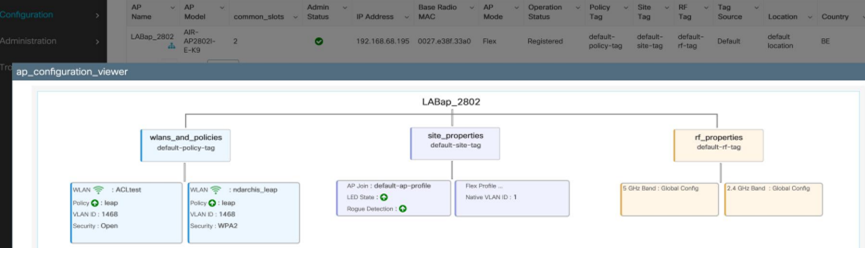


PART 7 - C9800 - Troubleshooting Commands

TROUBLESHOOTING COMMANDS FOR GIVEN CONDITIONS

 How to monitor tag configuration

show ap tag summary

wireless config validate

Verifying applied configuration – WLC CLI

show ap name APa80c.0dd2.1fa8 tag detail

Verify the mappings on the AP

show capwap client config

Verifying applied configuration – Web UI


Radioactive Tracing Filtering and Cleanup
• AP debugging by mac works for all radio/rrm/etc processes. DTLS will not work
• AP debugging by its IP address works for DTLS, but misses all later processes
Always remove conditions
# clear platform condition all
# undebug all

Alarm LED and critical platform alarms

All 9800 appliances (9800-L, 9800-40 and 9800-80) have an ALM LED on their front panel. If that LED goes red, it means that there is a critical alarm on the platform.

#show facility-alarm status

List of all commands from C9800 Wireless Controller
show ap summary | i Number of APs
sh log | i AP Event:
show ap uptime
show ap cdp nei
show ap crash
dir all | i crash
show wireless stats ap history
show wireless stats ap discovery
show wireless stats ap join summary
show wireless certification config
show wireless management trustpoint
show wireless dtls connections
show wireless stats ap history mac-address Ethernet_MAC@
show wireless stats ap mac Radio_MAC@ discovery detailed
show wireless stats ap mac Radio_MAC@ join detailed
show logging profile wireless start last X days filter mac <radio-or-ethernet-AP-mac>
show tech wireless ap name <ap-name>
show wireless loadbalance ap affinity mac Ethernet_MAC@ 
show wireless loadbalance ap affinity wncd <0-7>
sh proc cpu platform | i wncd
debug wireless mac <AP_Radio_MAC> internal monitor-time 2085978494

List of all commands from Access Points 
show tech
show dtls connection
term mon
debug capwap client events
debug capwap client error
debug capwap client pmtu
debug capwap client keepalive
debug capwap client payload
debug capwap client details
debug capwap client info


PART 6 - C9800 - Troubleshooting - Commands -High Availability issues

 High Availability issues


Outputs to check Key Performance Indicators (KPIs) to identify if there could be any High Availability issue:

Check uptime for redundancy peers, and if there is any redundancy event

show redundancy | i ptime

sh log | i REDUNDANCY

Additional logs to collect for High Availability issues

show redundancy states

show redundancy counters

show redundancy switchover history

sh logging onboard uptime !!just for physical WLCs: 9800-40/9800-80/9800-L

show chassis ha-status active

show chassis ha-status standby

sh platform software stack-mgr chassis active R0 sdp-counters

sh platform software stack-mgr chassis standby R0 sdp-counters

sh platform software stack-mgr chassis active R0 peer-timeout

sh platform software stack-mgr chassis standby R0 peer-timeout


PART 5 - C9800 - Troubleshooting Commands - License Issues

 License Issues


Outputs to check key performance indicators KPIs to identify if there could be license issue:

Confirm that WLC is showed as registered and number of APs licensed matches the number of APs

show license summary | i Status:|AP

sh ap sum | i Number of APs

Additional logs to collect for license issues

show tech-support license

show logging process ios start last boot to-file bootflash: <file-name>


PART 4 - C9800 - TroubleShooting Commands -Radio Frequency (RF) or Radio Resource Management(RRM) Issues

 Radio Frequency (RF) or Radio Resource Management(RRM) Issues


Outputs to check key performance indicators KPIs to identify if there could be RF or RRM issues:

Check for APs using the same channel, max transmit power, high channel count or high channel utilization. For more detailed RF analysis use config analyzer. 

show ap dot11 [24ghz|5ghz] summary

sh ap auto-rf dot11 [24ghz|5ghz] | i Channel Change Count|Channel Utilization

Additional logs to collect for RF and RRM issues:

set platform software trace wireless chassis active r0 rrm all info 

!!Debug txpower logs:

set platform software trace wncd chassis active r0 radio-history-txpower info

!!Debug channel changes logs:

set platform software trace wncd chassis active r0 radio-history-channel info

!!Debug radio resets

set platform software trace wncd chassis active r0 radio-history-reset info

!!Debug DFS events

set platform software trace wncd chassis active r0 radio-history-dfs info

!!Collect and decode traces:

show logging profile wireless internal [to-file <file-name>] 

!!Change level back to notice:

set platform software trace wncd chassis active R0 all-modules notice 

set platform software trace wireless chassis active R0 rrm all notice


PART 3 - C9800 - Troubleshooting Commands - Guest Central Web Authentication(CWA) or Local Web Authentication(LWA) Issues

 Guest Central Web Authentication(CWA) or Local Web Authentication(LWA) Issues


This scenario covers guest client web authentication issues, client not receiving redirect URL, not able to authenticate.

Outputs to check key performance indicators KPIs to identify if there could be web authentication issues:

Check for clients stuck in webauth state, check the number of intercepted request, received messages and replied error status replies 

show wireless client summary | i Webauth|Number

show wireless stats client detail | i HTTP

Additional logs to collect for web authentication issues:

Always-On Tracing: 

show logging profile wireless filter mac <rClient_MAC> to-file always-on-<FILENAME.txt>

RadioActive Tracing:

debug wireless mac <Client_MAC> 

Embedded Captures filtered by client MAC:

monitor capture MYCAP clear

monitor capture MYCAP interface Po1 both

monitor capture MYCAP buffer size 100

monitor capture MYCAP match any

monitor capture MYCAP inner mac <Client_MAC>

monitor capture MYCAP start

!!Reproduce

monitor capture MYCAP stop

monitor capture MYCAP export flash:|tftp:|http:.../filename.pcap

show wireless stats client summary | i <Client_MAC>

show wireless stats client delete reasons

show tech wireless client mac-address <Client_MAC>

!!Client WLAN Adapter wireshark captures or Over The Air(OTA) sniffer trace.

show ip http server all

show tcp statistics

show ip traffic

show ip access-list

show tech-support wireless client 

show tech-support wireless client mac-address <Client_MAC>


PART 2 - C9800 - TroubleShooting Commands- Client Connectivity Issues

 Client Connectivity Issues


This scenario covers client connectivity issues, association issues, authentication issues, disconnections, and roam issues.

Outputs to check key performance indicators KPIs to identify if there could be client connectivity issues:

Check for client delete reasons, identify top delete reason and see if counters increase

show wireless stats client delete reasons | ex 0

Additional logs to collect for client connectivity issues.

Always-On Tracing: 

show logging profile wireless filter mac <Client_MAC> to-file always-on-<FILENAME.txt>

RadioActive Tracing:

debug wireless mac <Client_MAC> 

Embedded Captures filtered by client MAC:

monitor capture MYCAP clear

monitor capture MYCAP interface Po1 both

monitor capture MYCAP buffer size 100

monitor capture MYCAP match any

monitor capture MYCAP inner mac <Client_MAC>

monitor capture MYCAP start

!!Reproduce

monitor capture MYCAP stop

monitor capture MYCAP export flash:|tftp:|http:.../filename.pcap


show wireless stats client summary | i MAC|<Client_MAC>

show tech-support wireless client

show tech-support wireless client mac-address <Client_MAC>


PART1 - C9800- TroubleShooting Commands- AP Join/Connectivity Issues

AP Join/Connectivity Issues


This scenario covers AP instability due to APs not been able to join WLC, AP disconnections, CAPWAP  tunnel flaps, AP crashes.

Outputs to check key performance indicators KPIs to identify if there could be AP issues:

Check for AP crashes, and for APs with an uptime lower than expected, check for APs that have association uptime lower than expected

show ap uptime !! Check Up Time vs Assoc Up Time. Check for patterns

show ap cdp nei !! Identify if all APs with similar Up Time were in same switch.

show ap crash !! Check if there are any AP crashes.

dir all | i crash !! Find AP crashes stored in WLC.


show ap summary | i Number of APs !!Check if number of APs matches with number we expect

sh log | i AP Event: !!Check if APs are disconnecting at same time, or exist any pattern for APs connecting/disconnecting.


show wireless stats ap history !! Find connect/disconnect events, time for those events, disconnect reason and count.

show wireless stats ap discovery !! Find discovery requests been received by WLC and time for those discovery requests

show wireless stats ap join summary !! Find status of the AP, last disconnection reason and in which phase disconnection occurred.


show wireless certification config !! Check DTLS version and cipher suite

show wireless management trustpoint !! Type of certificate used

show wireless dtls connections !! Show if DTLS is established for capwap control/data ports used


show wireless stats ap history mac-address Ethernet_MAC@ !!Check type of event and time for the event and disconnect reason and count for specific AP.

show wireless stats ap mac Radio_MAC@ discovery detailed !!Check number of discovery request/responses, discovery failures and type for last working discovery and non working discovery.

show wireless stats ap mac Radio_MAC@ join detailed !!Counters for different phases discovery, dtls, join, config, data dtls. Also shows last reboot type and reason. Disconnect type and reason.

show logging profile wireless start last X days filter mac <radio-or-ethernet-AP-mac> !!Always-on-tracing for this AP shows more detailed events errors stored in the WLC trace database. Config changes, radio events, association/disassociation events.

show tech wireless ap name <ap-name> !! Config details, tag, radio info channels/txpower, SSIDs, ...


show wireless loadbalance ap affinity mac Ethernet_MAC@ !!Check wncd assigned to concrete AP mac address, we can also get wncd for concrete site-tag

show wireless loadbalance ap affinity wncd <0-7> !!Other option is to check all APs assigned to a concrete wncd.

sh proc cpu platform | i wncd !! Check CPU utilization per wncd