Showing posts with label SCRIPTING. Show all posts

Friday, 30 June 2023

PYTHON - FILE CONVERT TO EXE

 PYTHON FILE CONVERT TO EXE

REQUIERMENT:

1.      PYTHON PROGRAM

2.      PYTHON INSTALLED PC- IDLE

LETs Example You have some python program WLC_BACKUP.py and you want to convert this in .exe so follow below process:

1.      Install Module auto-py-to-exe :

Use the PIP to install the Module in Python

pip install auto-py-to-exe

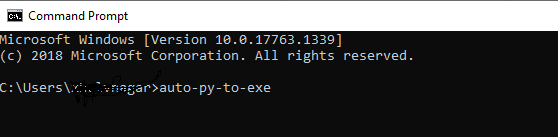
After above Module Install run the below command on CLI


Locate the PY file on above browser and Click on Convert .py to .exe

New Folder will create in Output 


Thursday, 6 April 2023

PART 2- DevOps - Why use NETCONF/YANG when you can use SNMP and CLI?


The main usage of NETCONF is to configure devices. But wait! We have been doing that for many-many years and we know the advantages and disadvantages of using SNMP and CLI to configure devices and networks. Do we really need  another protocol?

To answer that question, let’s take a closer look to CLI and SNMP disadvantages

Important CLI limitations

CLI scripting is the primary approach to making automated configuration changes to the network, at least prior to NETCONF.

Unfortunately, CLI scripting has various limitations and the most important one is the lack of transaction management. Configuring a device maybe a complex task, involving multiple actions i.e. configuration changes, that need to take place.

Usually these multiple actions can not be done partially, as this would leave the device in an undefined state. In case one action fails, we need to rollback, i.e. undo all previous actions. This requires extensive programming when transaction management is not supported and this is the case with CLI.

Lack of structured error management is the second big issue of CLI. Usually whenever a new device software is released, new CLI commands are added but unfortunately in some cases existing commands are modified or deleted. This means that every other software that was using CLI as an application programming interface (API) will fail, and most probably without gracious handling of the errors.

This ever changing structure and syntax of CLI commands is what makes CLI scripts fragile and costly to maintain. These are all side-effects of the basic fact that CLIs are designed to be used by humans and not an API for programmatic access.

SNMP complexity disadvantages

SNMP was developed to be used for both monitoring and management, i.e. it has the capability to write changes. So why is SNMP mostly used for fault and performance monitoring and not configuration changes?

The main reasons for this is the complexity of SNMP and therefore the inherent lack of a standard automatic discovery process that finds the (correct) MIB modules that the device is using. This means that the discovery work must be done by the users or operators and as it is complex, configuration management with SNMP has been abandonded.

The disadvantages inherent in the use of the UDP protocol where messages can be just lost, and the lack of useful standard security and commit mechanisms have also played a significant role in the replacement of SNMP with CLI for configuration of devices.

Key NETCONF Capabilities


The key with NETCONF protocol is that it was designed to address the shortcomings of existing practices and protocols for configuration management including:

Distinction between configuration and state data

Multiple configuration data stores (candidate, running, startup)

Configuration change transactions

Configuration testing and validation support

Selective data retrieval with filtering

Streaming and playback of event notifications

Extensible procedure call mechanism

But is NETCONF really being used to configure devices?

According to an article of LightReading, even from 2013 there has been a major rush from many of the major vendors to support NETCONF and YANG as part of the rush to, at least publicly, embrace “open networks. Among the supporters were Brocade Communications Systems Inc.  Cisco Systems Inc., Juniper Networks Inc., Ericsson-LG , and Nokia Networks , but notably not Alcatel-Lucent.

But what is the benefit of NETCONF that outweighs the cost of replacing existing protocols? The operator’s target is to get humans out of the loop of configuration management, as it has been estimated that up to 60% of configuration errors are due to humans mistyping things or translating things wrong from print to their console.

Summary

NETCONF’s development began in the IETF way back in 2003, as network operators realized that SNMP while widely deployed, was inadequate for network configuration and that individual vendor CLIs can’t easily be programmed for automation and require human interpretation.

NETCONF’s adoption had been slow, but with the emergence of SDN/NFV, NETCONF is the (only) cadidate to replace CLI for configuration management of programmable networks.


Wednesday, 5 April 2023

PART 1 - DevOPs -DOCKER - Netconf and Yangs Configuration and Verification

Pre-Check 

show run | i aaa   > check authorization 

show run | i ssh   > SSH version and ssh source 

show run | i netconf > check netconf enable or not


COMMAND TO ENABLE netconf

conf t

netconf-yang

username <> privilege 15 password 0 <>

aaa new-model 

aaa authorization exce default local 

!

snmp-server community public RW

snmp-server trap link ietf

snmp-server enable traps snmp authntication linkdown linkup

snmp-server enable traps syslog

snmp-server manager

!

netconf-yang cisco-ia snmp-trap-control trap-list 1.3.6.1.6.3.1.1.5.3

netconf-yang cisco-ia snmp-trap-control trap-list 1.3.6.1.6.3.1.1.5.4

netconf-yang cisco-ia snmp-trap-control trap-list 1.3.6.1.4.9.9.41.2.0.1

!

 logging history debugging 

 logging snmp-trap emergencies

 logging snmp-trap alerts

 logging snmp-trap critical

 logging snmp-trap errors

 logging snmp-trap warnings

 logging snmp-trap notifications

 logging snmp-trap informational

 logging snmp-trap debugging


!

verficiation 

#show platform software yang-management process

TEST CONNECTION ON NETCONF SSH PORT 830 (TCP)

ssh -l "username" 10.x.x.x -p 830 

Telemetry 

#show telemetry ietf subsciprtion all

DOCKER CONTAINER ON CAT9K (App Hosting) VERIFICATION

show iox-service

show run | se app-host

show app-hosting list

show app-hosting detail appid xRDP

app-hosting connect appid xRDP session